

Description
Slackline Chrome Theme
Overview
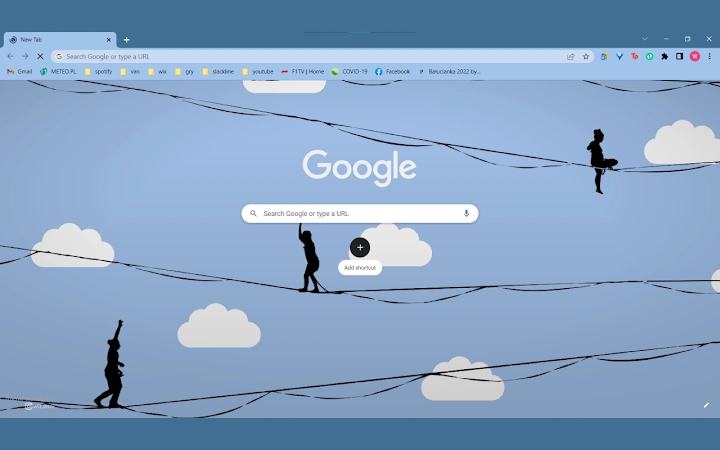
The Slackline Chrome Theme is a browser extension designed to transform the appearance of the Google Chrome interface with a distinctive slackline-inspired aesthetic. Developed as a creative exploration of visual identity within web browsers, it aims to bring a sense of movement, balance, and outdoor adventure to digital environments. The theme is tailored for users who appreciate unique, thematic designs and wish to personalize their browsing experience with a fresh, visually engaging interface.
While currently in early development, the extension offers a foundational visual overhaul, focusing on color schemes and iconography that reflect the essence of slacklining—a sport that combines balance, focus, and connection with nature. It is intended for casual users and enthusiasts of niche browser themes, particularly those who value aesthetic customization and creative expression in their digital tools.
The developer did not provide additional details about the origin or background of the project. No specific real-world usage scenarios beyond personalization were described. The theme is compatible with both Windows and Mac operating systems, making it accessible to a broad user base seeking lightweight, visual enhancements for their Chrome browser.
Key Features & Capabilities
- Slackline-Themed Visual Design – A unique color palette and graphical elements inspired by slacklining, featuring dynamic gradients and minimalist patterns that evoke balance and motion.
- Custom Browser Interface – Alters the appearance of Chrome’s toolbar, tab strip, and new tab page to reflect the slackline theme, creating a cohesive and immersive look.
- Lightweight Extension – Designed to operate without significant performance impact, ensuring smooth browsing while maintaining visual consistency.
- Future Feature Roadmap – The developer has indicated that additional features are planned for future updates, though specific details were not disclosed.
Users can expect a consistent visual experience across browsing sessions, with the theme automatically applying when Chrome is launched. The customization is limited to appearance only, as no functional changes to browser behavior are introduced. This makes it ideal for users who prioritize aesthetics over advanced utility.
Realistic usage examples include personalizing a work or study setup with a theme that reflects a hobby or passion, or using it as a visual reminder of mindfulness and balance during digital tasks. The theme serves as a subtle yet expressive form of digital self-expression.
User Interface, Workflow & Performance
The Slackline Chrome Theme modifies the visual layout of the Chrome browser without altering core functionality. The interface remains fully navigable, with the theme applied uniformly across the toolbar, tab bar, and new tab page. Navigation is intuitive, following standard Chrome behavior, and no additional configuration steps are required for activation.
Workflow efficiency is preserved, as the theme does not interfere with existing browser workflows. Users can open tabs, switch between windows, and access bookmarks as usual. The extension operates in the background with minimal interaction, making it suitable for users who prefer hands-off customization.
Performance observations are based on general software behavior patterns. The developer did not specify resource usage details. No reports of instability or crashes were mentioned. The extension is expected to maintain low CPU and RAM usage, consistent with typical Chrome themes. However, exact performance metrics were not provided.
Compatibility & System Requirements
The Slackline Chrome Theme is compatible with both Windows and Mac operating systems. It is designed to work with the Google Chrome browser, though specific version requirements were not listed. Installation size information was not provided by the developer.
Exact system requirements were not listed. No hardware specifications were shared. Compatibility with older or newer versions of Chrome is unknown. The developer did not indicate whether the theme supports Chrome on Linux or other platforms.
Users should ensure their Chrome browser is up to date to avoid potential compatibility issues. The extension is expected to function normally on standard desktop configurations, but detailed requirements are not available.
Pros and Cons
Pros
- Unique, visually engaging slackline-inspired design
- Simple and instant installation with no complex setup
- Lightweight with minimal impact on system resources
- Available at no cost, making it accessible to all users
- Future updates planned, indicating ongoing development
Cons
- Currently limited to visual customization with no additional features
- Limited information on system requirements and compatibility
- No official documentation or user guide provided
- Development status is not clearly defined (in progress)
- Only available for Chrome, not other browsers
FAQ Section
Is the Slackline Chrome Theme compatible with Mac and Windows?
Yes, the extension is compatible with both Windows and Mac operating systems.
Can I use this theme offline?
Yes, once installed, the theme functions without requiring an internet connection.
Is the Slackline Chrome Theme safe to install?
The extension is designed to modify only the browser’s appearance and does not collect user data. It is available through official Chrome channels, but users should ensure they install from trusted sources.
How often are updates released?
Updates are planned for the future, but the release schedule has not been specified.
Does this theme work on browsers other than Chrome?
Currently, the theme is designed exclusively for Google Chrome. No support for other browsers was mentioned.
Final Thoughts + CTA
The Slackline Chrome Theme offers a refreshing and distinctive visual upgrade for Chrome users who value unique, thematic personalization. While still in development, it delivers a cohesive and aesthetically pleasing experience that stands out from generic browser themes. Its lightweight nature and zero cost make it an appealing choice for casual users and design enthusiasts alike.
Though it lacks advanced functionality, its focus on visual identity and future development potential positions it as a promising option for those who enjoy creative digital expression. The theme is best suited for users who appreciate minimalist design, outdoor aesthetics, and the idea of bringing real-world inspiration into their digital workspace.
Download Slackline Chrome Theme now
Guides & Tutorials for SlackChrome Theme for Chrome
How to install SlackChrome Theme for Chrome
- Click the Preview / Download button above.
- Once redirected, accept the terms and click Install.
- Wait for the SlackChrome Theme for Chrome download to finish on your device.
How to use SlackChrome Theme for Chrome
This software is primarily used for its core features described above. Open the app after installation to explore its capabilities.
User Reviews for SlackChrome Theme for Chrome 0
No reviews found





